

Releases and Reviews
Projects, Releases, and Reviews are presented as separate records. Each project record, obviously, represents information about a project. A project may have multiple releases; information about the release is represented in a release record. The release record also contains some review information. This information is included here, because all releases do not necessarily have a review (a project can opt to provide some review type information as part of a release record. A project can have multiple review records; as release reviews are the most common form of review, most review records will be joined to a release record.
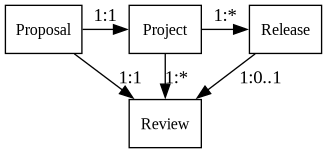
A review record, however, does not require a release association. Some reviews are associated with proposals. Other have no other association (e.g. termination reviews).
Each release has its own record in the database. Records are connected directly to a single specific project; a subset of release records associated with a project are displayed on the project page. An existing release can be edited in much the same was as a project. Any logged in project member (committer or project lead) can switch to the Edit tab.
Create a single record for each release. Do not create release records for milestone builds. You may optionally enter milestone information in the Plan information of a release record.
Tip: Use the Create a new release command on a specific project page in the Project Management Interface (PMI) to create a new release record.
Description
Describe the release in the Description section. The description should generally be a concise paragraph describing the focus of the release (e.g. adding certain functionality, fixing bugs, etc.) in a form that is appropriate in an aggregation (e.g. a page that displays the release information for all projects participating in an instance of the Simultaneous release). The description should provide enough information to encourage the reader to click the find out more link.
Plan
Project plan information belongs in the Plan section. This information should generally be provided early in the development cycle to allow the various communities the ability to understand and participate in the release. It is expected that the plan will evolve over time. Note that all projects are required to provide a plan for each major and minor release (plans are not required service releases).
Review
The release record has a Review section that can be used to provide information for an associated release review. If you provide information in the Review section, the release record itself can be used as review documentation; no further documentation is required.
Each section on the review page includes a little help to describe the sort of information that you should provide.
Note: A review is not necessarily required for every release. A project team may declare official major or minor releases and distribute associated products for up to one year following a successful progress review and reviews are never required for bug-fix/service releases.
If a release requires a review, you can schedule one by clicking the Schedule a review link. The drop-down list above the button contains several options for review dates. Pick the one that works best for you.
Note that this form will not appear if a review has already been scheduled, or the release date does not provide enough time to run a review (or is in the past). If a review has been scheduled, a link to the review will appear.
You can edit the review document, but there’s really not all that much to edit. A free-form text field is available and can be used if there is some need to provide review-specific information that might not otherwise be an appropriate part of the release record.
Note: The free-form text field in the review record is intended for other types of reviews (e.g. restructuring or termination reviews); we decided to leave it available for release reviews for cases in which it might be useful rather than suppress it.
When the review is displayed, it automatically includes the review information from the release record; it shows the review-specific information at the top of the page, and includes the review information from the release as the rest of the page contents.
This can make things a bit confusing when you want to make changes to the metadata for a review record. Just remember that the review information for a release is stored in the release record.