

Third Party Content
The term third party content refers to any content that is leveraged by the Eclipse project that is not produced and/or maintained as an asset of the project. This includes content from other Eclipse projects.
This includes (for example):
- References in a Java®/OSGi manifest that makes a direct reference to third party content (either a bundle or package);
- Imports of packages in Java source;
- Includes of header files in C/C++;
- References to NPM modules via a
package.json,package-lock.json, oryarn.lockfile; - References to Go modules via a
go.sumfile; - Entries in the
dependenciessection of a Mavenpom.xmlfile; - Use of reflection or other means to reference APIs and implementation;
- Use of OSGi Services to make a reference to a specific implementation of a service; and
- Invocation of a command line interface.
This is list is not exhaustive. The exact nature of the dependencies and how they are specified varies from technology to technology.
The set of dependencies also includes third party content that is referenced by third party content, whether or not it is directly referenced by the Eclipse project content. That is, the dependencies of an Eclipse project includes the entire transitive closure of the immediate dependencies.
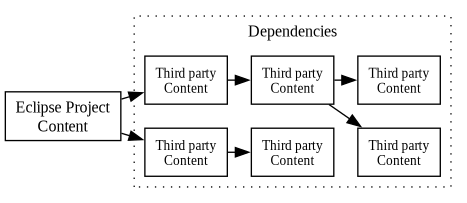
The pedantic reader will observe that one can follow the chain of dependencies all the way down to silicon.
We cut the dependency graph off at the platform. The definition of platform varies by technology and intention. In general, we regard the platform as the layer(s) that adopters of the Eclipse software install independently as a foundation for the project software.
For example:
- For a Java-based application, the Java runtime would be the platform;
- For an application based on Jakarta EE technology, the application server would be the platform;
- For an NPM application, node would be the platform; and
- For a native application, a Linux based operating system, Windows, or MacOS would be the platform.
This is list is not exhaustive.
Note: We regard the platform as something that the adopter installs and agrees to the licensing terms independently from the project content. If you’re bundling the platform with your project’s binaries, for example, then the platform is a dependency. If a layer of software is installed as part of installing your project’s artifacts (e.g., via Maven), then that layer of software is a dependency.
If you’re not sure ask the IP Team for assistance.
Maven Example
The following snippet from a Maven pom.xml file includes a single dependency that itself has dependencies.
Snippet from an example Maven pom.xml file
...
<dependencies>
   <dependency>
      <groupId>commons-httpclient</groupId>
      <artifactId>commons-httpclient</artifactId>
      <version>3.1</version>
   </dependency>
</dependencies>
...
When Maven resolves the dependencies, it must also resolve dependencies of dependencies recursively. The dependency:tree plug-in generates a graph of the entire dependency tree (note that the example is abridged).
Dependency graph generated by Maven
$ mvn dependency:tree
...
[INFO] org.eclipse.dash:good-stuff:jar:0.0.1-SNAPSHOT
[INFO] \- commons-httpclient:commons-httpclient:jar:3.1:compile
[INFO]    +- commons-logging:commons-logging:jar:1.0.4:compile
[INFO]    \- commons-codec:commons-codec:jar:1.2:compile
...
Every library in the entire transitive closure of the dependency graph is a prerequisite.
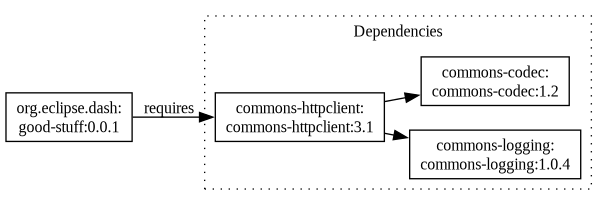
In this example, commons-httpclient:commons-httpclient:3.1, commons-logging:commons-logging:1.0.4, and commons-codec:commons-codec:1.2 must all be vetted for license compatibility.
Versions of Dependencies
Prerequisites are version specific. Since it is possible that problematic intellectual property may be added in a new version of a prerequisite, every version of a prerequisite is treated as distinct content. In practical terms, this means that project teams are required to engage the due diligence process with each separate version of Prerequisite content they require.
This applies specifically to major and minor versions of prerequisites.
Project teams are not required to engage with the IP Team to review service releases for third party content, provided that the service release is based on a release that has either been vetted by the due diligence process. A service release is defined as a release that is backwards compatible and contains only bug fixes. If a project team isn’t sure whether or not a particular release is a service release, they should submit the content for review by the IP Team.
Test and Build Dependencies
Warning: This section applies specifically to open source libraries and tools only; it does not apply to the use of proprietary tools.
Test and build dependencies are those third party libraries and tools that are considered non-distribution contributions. That is, these libraries are not actively distributed by the project via any generally-accessible eclipse.org property. These libraries and tools may, for example, persist on the build server which is accessible only to Eclipse committers; they may not, for example, persist on the eclipse.org download or archive servers, web server, or any source code repository. Eclipse project content (e.g., build scripts) distributed via eclipse.org source code repositories may contain references to these libraries and tools (but not the libraries/tools themselves). Project documentation should list these dependencies, how they are obtained (either manually or automatically via scripts), and other issues (especially licensing).
If you have any questions or concerns, please contact EMO.