

GitHub
Project teams may opt to host some or all of their canonical source code repositories to an organisation on GitHub that is maintained by the Eclipse Foundation. Both GitHub Issues and Wiki may also be used.
Any committer can open a Help Desk issue to request that the Eclipse Infrastructure Team create a new repository for their project on, or move an existing repository to, GitHub. A project may have more than one repository on GitHub. When making the request, the committer should describe — specifically and concisely — what they want to make happen. Note that the Eclipse Infrastructure Team will verify the request with the project leads.
A dedicated organisation can be created for your project. By default, the conjunction of eclipse- and the project’s short name is used as the organisation name (e.g., eclipse-woolsey). Other configurations are possible; if you have specific requirements for your project, connect with the EMO.
The Eclipse Infrastructure Team installs some hooks onto all Eclipse project repositories on GitHub.
The Committers hook grants designated project committers write access to the GitHub-hosted project repositories. Project committers must add their GitHub id to their Eclipse Foundation account, and must use the email address they provide to the Eclipse Foundation as the email address in the author credentials of all commits.
The Eclipse Contributor Agreement (ECA) hook will inspect incoming GitHub pull requests to ensure that the contributor has a valid ECA on file. Project committers should only merge green pull requests:
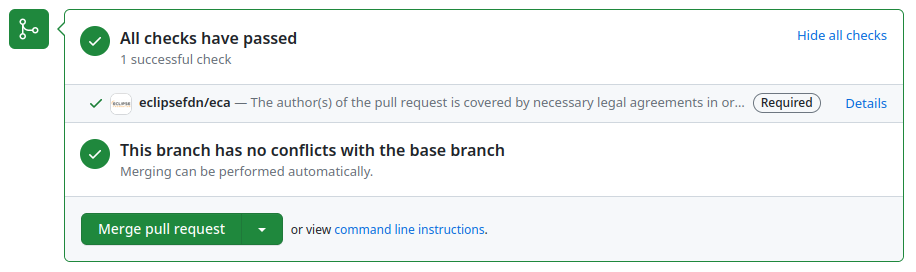
Since the GitHub API does not provide a way for a Committers hook to absolutely deny a merge by itself, the hook warns committers when the contributors have not signed an ECA.
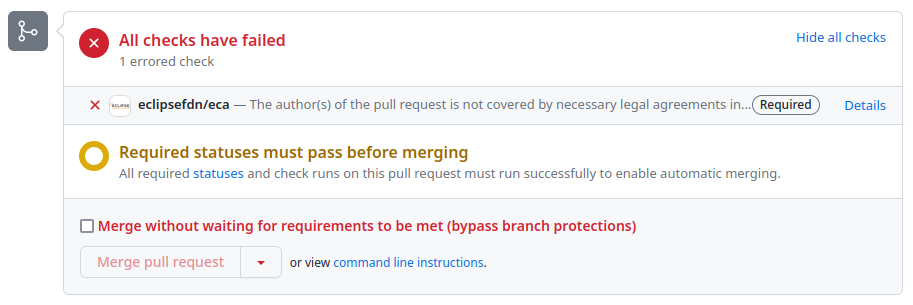
Click on the Details link for more information. Committers must not merge commits unless they are certain that the contributor does have a valid ECA on file.
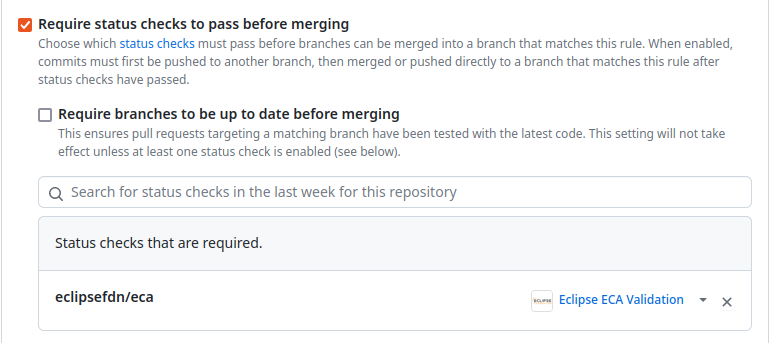
It is however possible to set up a Branch Protection Rule for branches to prevent that pull requests which fail the ECA validation are getting merged into them:
Access to GitHub Repositories
Eclipse Foundation scripts build and maintain a collection of GitHub Teams, each with permissions appropriate to the corresponding Eclipse project roles (project lead, committer, and contributor).
Tip: The scripts require knowledge of the GitHub Id in order to add any individual to any of the teams. Be sure to include your GitHub Id in your Eclipse Foundation Account.
GitHub’s Repository roles for an organisation document describes the permissions granted for each of the roles (Maintain, Write, and Triage) described below.
- Project Leads Team
All project leads are automatically added to the project leads team. All members of the project leads team are granted the Maintain role on their project’s GitHub repositories. When an individual is elected into the role of project lead, they are automatically added to the project leads team. When a project lead is retired, they are automatically removed from the team.
A project lead may request temporary Admin level access to their project’s repositories by creating a Help Desk issue with their request. The issue must describe what will be done using this new level of access and how long it will be needed.Warning: With the Maintain role, project leads have significant privileges on GitHub repositories. Project leads must not manipulate the configuration of GitHub organisations and repositories in a manner that would violate the Eclipse Foundation Development Process or the Eclipse Foundation Intellectual Property Policy.
For example, project leads must not manipulate teams or privileges and must specifically not add or remove developers directly. See Committer Elections for information on how to add developers to a project, and Committers Retirement for information on how to remove developers from a project.
Project leads must provide their GitHub Id in their Eclipse Foundation Account. - Committers Team
All committers are automatically added to the committers team. All members of the committers team are granted the Write role on their project resources hosted on GitHub. When an individual is elected into the role of committer, they are automatically added to the committers team. When a project lead is retired, they are automatically removed from the team.
Committers must provide their GitHub Id in their Eclipse Foundation Account. - Contributors Team
All contributors are automatically added to the contributors team. All members of the contributors team are granted Triage level access to project resources hosted on GitHub. When an individual is added to the project’s Contributors list, they are automatically added to the contributors team. When they are removed from the Contributors list, they are automatically removed from the team.
Contributors must provide their GitHub Id in their Eclipse Foundation Account.
The Eclipse Contributor Agreement (ECA) hook inspects incoming pull requests to ensure that the contributor has a valid ECA on file, and flags those that do not. Project committers should only merge pull requests that pass this validation.
Self-Service of GitHub Resources
The Eclipse Foundation offers self-service of GitHub resources via a tool named Otterdog.
Upon opting-in, a new repository .eclipsefdn will be created that hosts the GitHub configuration as code.
Example Otterdog configuration
orgs.newOrg('adoptium') {
    settings+: {
      blog: "https://adoptium.net",
      default_repository_permission: "none",
      default_workflow_permissions: "write",
      description: "The Adoptium Working Group promotes and supports high-quality runtimes and associated technology for use across the Java ecosystem",
      members_can_change_project_visibility: true,
      members_can_change_repo_visibility: true,
      members_can_delete_repositories: true,
      name: "Eclipse Adoptium",
      readers_can_create_discussions: true,
      security_managers+: [
        "adoptium-project-leads",
      ],
      twitter_username: "adoptium",
      web_commit_signoff_required: false,
    },
   ...
}
The following resource configurations are available:
- Organisation Settings
- Organisation Webhooks
- Repositories and their settings
- Branch Protection Rules
Committers can create pull requests for this repository with suggested changes. A workflow will automatically run, validate and highlight the changes:
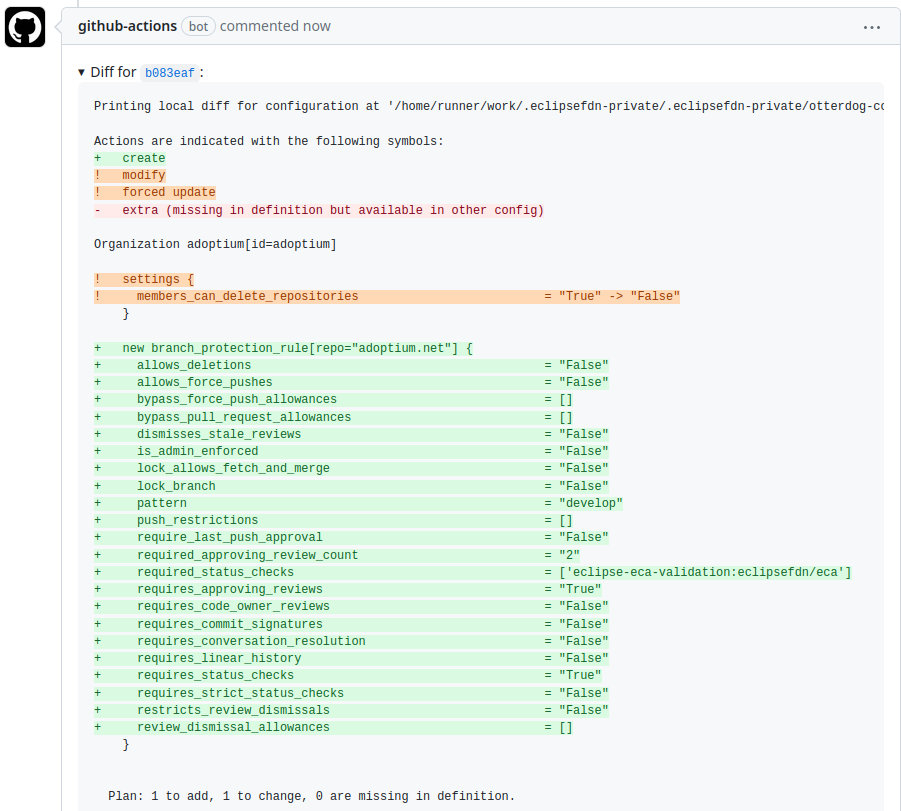
The pull request needs to be approved by an Eclipse Foundation staff member and once its merged, the changes will get applied to GitHub.
The baseline configuration used by the Eclipse Foundation can be accessed here.