

Features Licenses and Feature Update Licenses
A feature is a set of one or more related plug-ins and/or fragments that can be installed and upgraded together. There are three important legal documentation files for features, the Feature License (license.html), the Feature Update License (the license property in feature.properties) and the Feature Blurb (the blurb property in about.properties).
Each feature has a file named license.html, called a Feature License, that contains the text of the SUA in HTML format. Each feature includes additional files containing the actual text of the project license(s) in HTML format (e.g. the Eclipse Public License 2.0 in file named epl-2.0.html).
Each feature has a file named feature.properties. In that file is a property named license, which is known as the Feature Update License. The Feature Update License must contain a copy of SUA in plaintext format.
Each feature has at least one plug-in associated with it which is the feature plug-in for that feature. Not surprisingly, this plug-in usually has the same name as the feature. The property named blurb contains text that appears in the About features dialog in the Eclipse workbench. This is known as a Feature Blurb. Blurbs often contain copyright notices and any other statements of attribution that may be required by licenses.
Note: The difference between the Feature License and Feature Update License is when they are shown to the user. The Feature License is only available once a feature has been installed. The Feature Update License is seen when a user is using the Install Dialog to install or upgrade a feature and must agree to an agreement before proceeding with the installation.
One thing that is important to note is that with the distributed licensing model used by plug-ins, unless a Feature Update License contains an aggregation of all the notices from the plug-ins for a feature, a user will not be able to see these notices before installing the feature. It is for this reason that the maintainer of a feature may choose to have different text for the Feature License and Feature Update License.
All features must contain a Feature License and a Feature Update License in the directory for that feature. The feature’s plug-in must contain a Feature Blurb.
The Feature License is found in the feature directory which is usually a sub-directory of the directory named features. Any referenced files (for example, the EPL) are located in the same location.
The Feature Update License is found in the feature directory which is usually a sub-directory of the directory named features. Any referenced files (for example, the EPL) are located in the same location.
The Feature Blurb resides in the plugins directory as either a sub-directory or a JAR. In the feature plug-in there is a file named about.properties., the Feature Blurb is the property named blurb. To view the blurb for each installed feature, go to the menu item Help › About Eclipse Platform › Feature Details and then select a feature. The blurb will appear in the bottom half of the dialog.
The Feature Checklist
- Every feature has the text of the SUA in HTML in
license.html; - Every feature has the project license(s) in HTML (e.g., typically the EPL in
epl-2.0.html); - Every feature has the text of the SUA in
plaintextin thelicensesection offeature.xmlor thelicenseproperty offeature.properties; and - Every feature plug-in has copyright notices, etc. in the
blurbproperty ofabout.properties
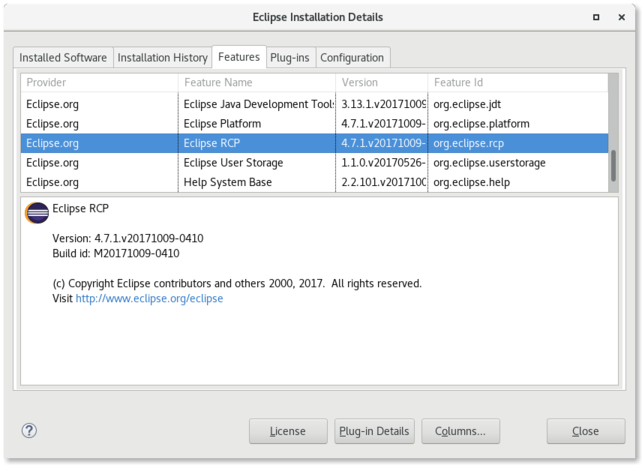
An example directory structure corresponding to the above description
eclipse
 ├── features
 │   ├── org.eclipse.rcp_4.7.1.v20171009-0410 - Feature directory
 │   │   ├── license.html - Feature License (SUA)
 │   │   ├── epl-2.0.html - The project’s primary licenses(s) referenced by the SUA/Feature License
 │   │   ├── feature.properties - Feature Update License (SUA) in `license` property
 │   │   └── ...
 │   └── ...
 ├── plugins
 │   ├── org.eclipse.rcp_4.7.1.v20171009-0410.jar - Plug-in packaged as a directory
 │   │   ├── about.properties - Feature Blurb in `blurb` property
 │   │   └── ...
 │   └── ...
 └── ...